iOS and Android
Native iOS and Android app for students, instructors, and parents. Same dashboards as the web, with student push, GPS drive tracking, and store installs that stay in sync with DriversEdPro.
iOS and Android
One Capacitor app, three role experiences. Sign in with the same account you use on the web and open the matching dashboard.
See course progress, practice hours, attendance, and upcoming classes. Join live sessions and complete makeup work from the student dashboard.
Manage drives on the road, message students, review schedules, and open school files. Billing and most admin tools stay on the web.
Stay connected to your student's progress, schedule, and school updates from the parent dashboard in the app.
Student experience
Students open the app and see where they stand: classes completed, practice hours logged, drive sessions finished, and what needs attention next. When makeup is required, the app surfaces it clearly.
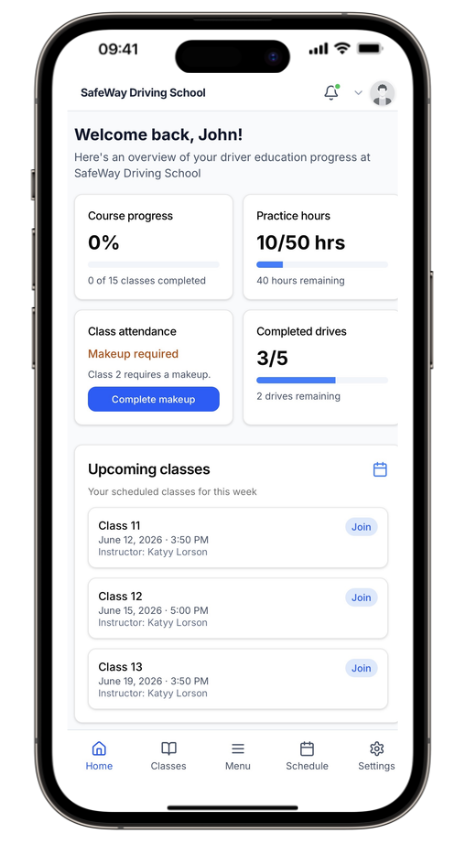
Home screen overview
Everything important on one scroll: progress, hours, attendance, and drives.
Bottom tab navigation
Jump to classes, schedule, and settings the way mobile users expect.
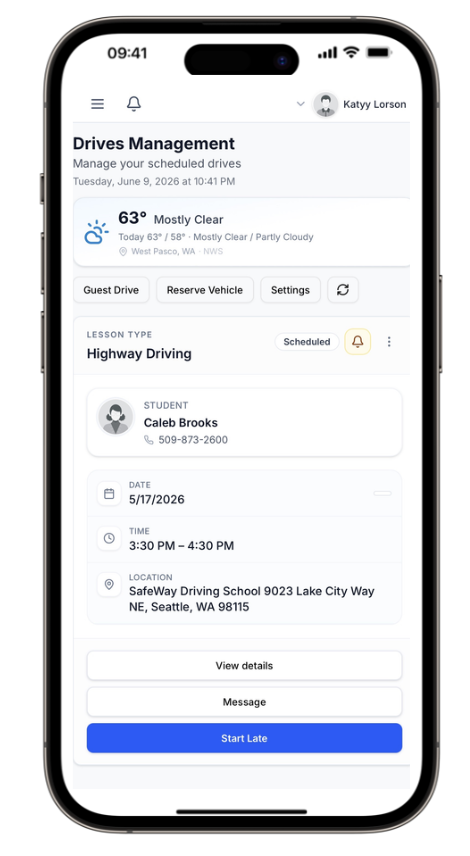
Today's drive card
Student name, phone, time, and location in one place, synced from the web schedule.
Start, message, or go late
The actions instructors use most, right on the drive card.
Instructor tools
Instructors see today's drives with student contact info, location, and session status at a glance. Start a lesson, send a message, or handle a late start from the drive card.
File manager
The mobile file manager mirrors your school folders on the web. Browse curriculum materials, student records, testing info, and admin documents with search, favorites, and quick download when you need a file between lessons.
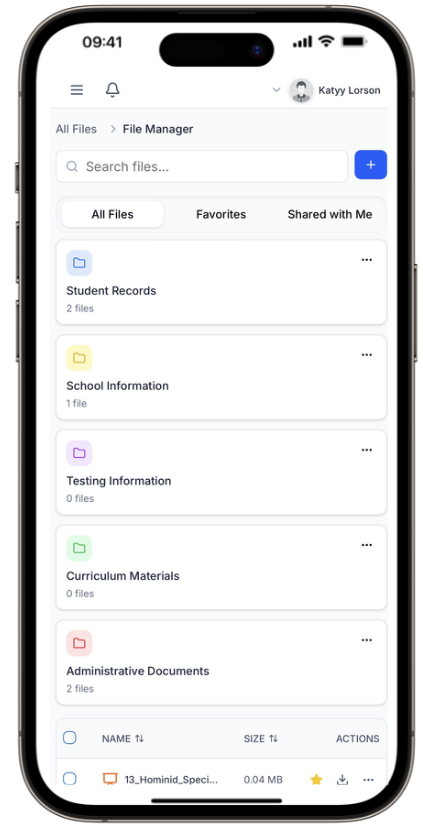
School folder structure
Student records, curriculum, testing info, and admin docs in the same folders as web.
Search and favorites
Find a document fast without walking back to a desktop.
Native capabilities
The app loads the same role dashboards in a Capacitor shell, then adds student push, GPS drive tracking, and store distribution.
Students can register for native push on iOS and Android so in-app notifications reach the phone.
Practice drives and instructor drives can use GPS tracking in the native app, including locked-screen tracking support.
Checkout opens on the website in the system browser, then returns to the app. In-app billing checkout is not supported.
Billing and most admin tools stay on the web. Instructors still get drives, messages, files, and drive-tracking tools in the app.
Always in sync
Schedule a drive on the web and it appears on the instructor phone. A student joins class from the app and attendance updates everywhere. No duplicate entry.
Changes on web or mobile reflect across both because they share the same DriversEdPro account data.
Classes, drives, and makeup sessions stay aligned.
Student push covers in-app notification alerts on native builds. Instructors and parents do not register for push in the current app.
One account, role-based access, familiar permissions.
iOS + Android
Platforms
Student · Instructor · Parent
Roles
Students
Push
Drive tracking
GPS
Available on the Apple App Store and Google Play Store. Search for DriversEdPro or use the links below to install on your iPhone, iPad, or Android device.